 Fantyzo
By the Fantyzo team · Fantyzo- A Solutions Factory LLC company
New Fantyzo releases may include bug fixes, usability improvements, new features, platform support, documentation updates, and refinements based on real-world testing. Staying current means you receive those improvements as they become available.
Fantyzo includes a built-in Check for updates… command so you can check immediately whenever you want.
How to check right now
Find the Fantyzo magnifying-glass icon in your system tray, open its menu, and choose Check for updates….
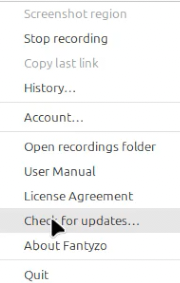
Fantyzo contacts the official Fantyzo update service and compares the version installed on your computer with the newest published release.
When a newer version is available
If Fantyzo finds a newer release, it tells you which version is available, which version you currently have, and gives you a short summary of what changed.
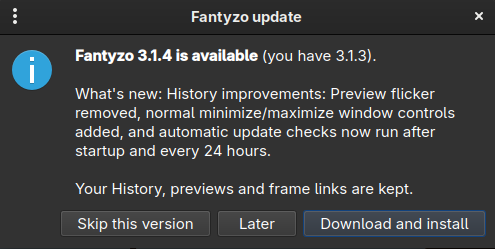
On supported installed Windows and Mint/Ubuntu builds, choosing Download and install lets Fantyzo download the correct package and begin the upgrade for you.
The downloaded package is checked against its published SHA-256 fingerprint before installation. That verification helps detect a damaged or unexpected download before Fantyzo runs it.
Your normal Fantyzo data is not replaced by an application update. Your History, previews, linked picture frames, and settings remain in your user data area while the application itself is upgraded.
If you already have the latest version
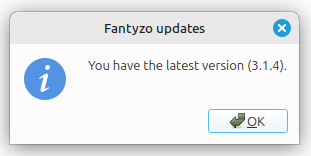
If no newer release exists, Fantyzo simply tells you that your installed version is current.
Fantyzo also checks automatically
Beginning with Fantyzo 3.1.4, Fantyzo performs an automatic update check shortly after the application starts. If Fantyzo remains running, it checks again every 24 hours.
Those automatic checks are intentionally quiet when there is nothing for you to do. If a newer release is available, Fantyzo can bring it to your attention. The manual Check for updates… command remains available whenever you want an immediate answer.
Why we like this approach
We want improving Fantyzo to be useful to the people already running it, not just to people visiting the download page. A good update mechanism shortens the distance between fixing something and getting that fix onto a user's computer.
Fantyzo 3.1.4 is a good example. It removed an annoying Preview-column flicker in History, gave the History window normal minimize and maximize controls, and refined automatic update checking. Once the release was published, users running 3.1.3 could discover and install it through Fantyzo itself.
A note for CachyOS users
Fantyzo can currently detect that a newer version is available on CachyOS. We are refining the automatic installation step there. Until that work is complete, CachyOS users should download the current CachyOS package from the Fantyzo download page and install it using the included installer instructions.
Fantyzo keeps improving — and Check for Updates helps make sure your copy improves with it.